
You launched your ad campaign, got clicks, then suddenly Facebook charged your card twice. Confused? You’re not alone.
Understanding how Facebook ads payment works isn’t just about knowing when charges happen, it’s about protecting your cash flow, avoiding account suspensions, and running profitable campaigns without financial surprises.
Facebook’s payment system operates differently from traditional advertising platforms. Instead of charging your entire budget upfront, Facebook uses a dual payment system combining payment thresholds with monthly billing dates. This means you could be charged multiple times throughout the month, but never more than you’ve actually spent on ads.
This complete guide breaks down exactly when Facebook charges you, which payment methods work best, and how to manage your billing settings like a pro. Whether you’re spending $100 or $100,000 per month, you’ll discover expert strategies used by successful advertisers worldwide.
Think of Facebook billing like a taxi meter, it runs as you go, not all upfront.
The Dual Payment Structure That Powers Facebook Ads
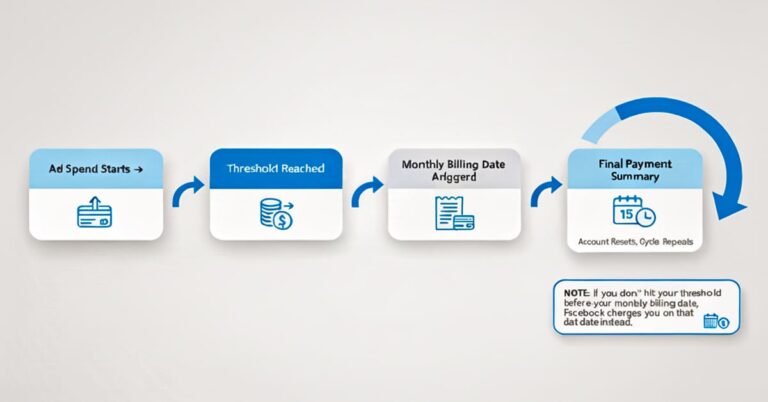
Facebook’s payment threshold system works alongside a monthly billing date to ensure smooth campaign delivery. Here’s how this dual system protects both you and Facebook:
Payment Thresholds act as automatic checkpoints. When your ad spend reaches predetermined amounts like $25, $50, or $250, Facebook charges your payment method immediately. This prevents large unexpected bills and helps Facebook manage risk across millions of advertisers.
Monthly Billing Date serves as a backup system. If you don’t hit your payment threshold by your monthly billing date (usually the same day each month when you first added a payment method), Facebook charges whatever amount you’ve spent.
Take Anna, a freelance graphic designer from Warsaw, who discovered this system firsthand. She set a $200 daily budget for her service promotion campaign and hit her $50 threshold in just three days. Facebook charged her $50, her ads kept running smoothly, and she generated 15 new client inquiries that same week.
Pay-As-You-Go Model: No Upfront Commitments
Unlike traditional advertising where you pay upfront for ad placements, Facebook’s pay-as-you-go model charges you only after people see or interact with your ads. This approach offers several advantages:
- No upfront payment required for your entire budget
- Real-time spending tracking shows exactly what you’ve spent
- Budget protection mechanisms prevent overspending
- Flexible scaling allows budget adjustments anytime
Your campaigns start immediately after approval, and charges accumulate based on actual performance, whether that’s clicks, impressions, or conversions.
Whether you’re using a Visa card in Paris or UPI in Delhi, Facebook has you covered.
Payment Methods That Actually Work
Facebook accepts multiple payment options to accommodate advertisers worldwide:
Credit and Debit Cards: Visa, Mastercard, American Express, and Discover cards work in most countries. Facebook processes these payments automatically and securely through encrypted connections.
PayPal Integration: Available in many regions, PayPal offers an additional layer of security and convenience. Once connected, Facebook charges your PayPal account following the same threshold and billing date rules.
Regional Payment Methods: Country-specific options include UPI in India, bank transfers in Germany, and mobile payments in various emerging markets. These options recognize local banking preferences and currency requirements.
Prepaid Account Funding: Some advertisers prefer adding money to their Facebook ad account balance first, then letting Facebook deduct spending from this prepaid amount.
Adding Payment Methods: Step-by-Step Process
Marco, who runs a traditional bakery in Rome, learned this process when his initial card was declined during his first campaign:
- Navigate to Ads Manager → Click the menu button (three lines)
- Select “Billing & Payments” from the account menu
- Click “Payment Methods” tab
- Choose “Add Payment Method” and select your preferred option
- Enter payment details and verify the method
- Set as primary or backup depending on your preference
Marco solved his payment issue by adding PayPal as his backup method. When his card was declined due to international transaction restrictions, PayPal automatically processed the payment, keeping his morning pastry ads running without interruption.
Payment Method Validation: Facebook runs small authorization charges (usually $1-2) to verify new payment methods. These charges typically reverse within 3-5 business days and don’t count toward your ad spending.
Here’s the million-dollar question: When does Facebook actually take your money?
Payment Threshold System: Your Billing Roadmap
Image type: Table/Progression Chart showing $25 → $50 → $100 → $250 → $500+ thresholds.
Facebook’s threshold progression starts small and grows based on your payment history and account reliability:
- Initial Threshold: $25 for new advertisers
- Second Threshold: $50 after successful payment
- Standard Thresholds: $100, $250, $500, $750
- Maximum Thresholds: $1,000+ for established accounts
Threshold Triggers: Facebook charges your payment method immediately when you reach these amounts. There’s no waiting period or grace period, the charge processes within minutes of hitting the threshold.
Monthly Billing Date: Your Safety Net
Your monthly billing date is set when you first add a payment method and remains consistent. This date serves as a backup billing trigger that captures any spending below your current threshold.
Real Scenarios That Show How This Works:
Scenario 1: Maria’s Barcelona restaurant hits her $250 threshold on the 15th after spending exactly $250 on lunch special promotions. Facebook charges $250 immediately, regardless of her monthly billing date being the 1st.
Scenario 2: James, a London consultant, spends $180 by his monthly billing date (the 3rd) but his threshold is $250. Facebook charges him $180 on the 3rd, then his threshold resets for the new billing period.
Scenario 3: Sofia’s Madrid boutique runs aggressive weekend campaigns. She hits her $500 threshold twice in one month, once on the 10th and again on the 25th, resulting in two separate $500 charges plus a final charge for remaining spend on her billing date.
Payment Priority: Threshold vs. Billing Date
The rule is simple: Whichever comes first triggers the payment. Facebook’s system continuously monitors your spending against both your current threshold and upcoming billing date, automatically processing charges when either condition is met.
Scenario | Threshold | Spending | Billing Date | Result |
Heavy Spender | $250 | $250 in 5 days | 1st of month | Charged at threshold |
Light Spender | $250 | $150 by month-end | 1st of month | Charged on billing date |
Consistent Spender | $500 | $500 every 2 weeks | 1st of month | Multiple threshold charges |
Ever wonder why two advertisers spend $100 but get completely different results?
Facebook’s Auction System Determines Your Costs
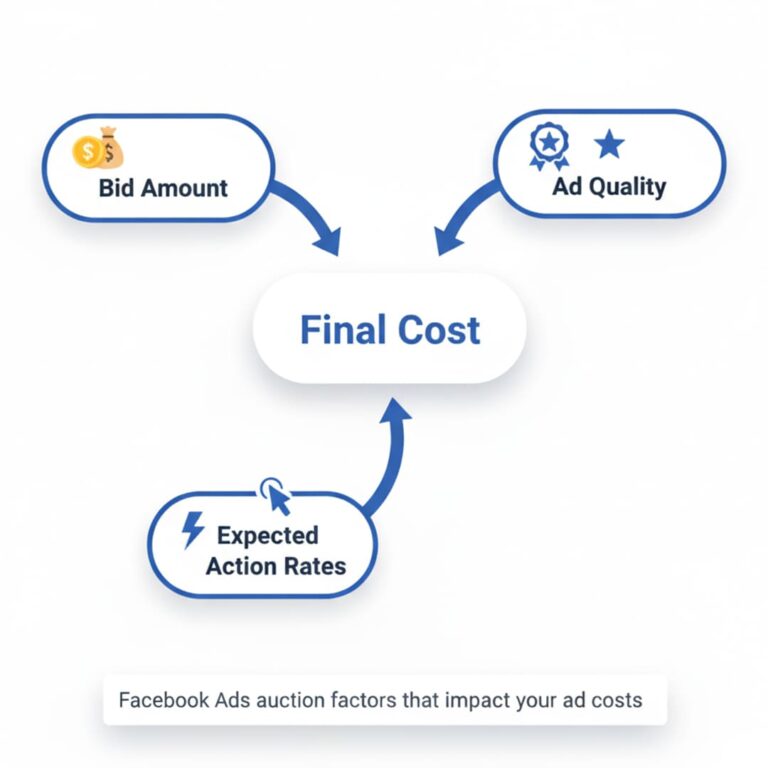
Facebook doesn’t use fixed pricing. Instead, every ad placement goes through a real-time auction where three factors determine your costs:
Your Bid Amount: This represents your maximum willingness to pay for your desired outcome (click, impression, conversion). Higher bids increase your chances of winning placements but don’t guarantee better results.
Ad Quality Score: Facebook evaluates your ad’s relevance, engagement history, and expected user experience. Higher quality ads cost less and reach more people within the same budget.
Expected Action Rates: Facebook’s algorithm predicts how likely users are to take your desired action. Ads with higher predicted engagement rates often win auctions with lower bids.
Understanding Different Billing Models
Cost-Per-Click (CPC): You’re charged only when someone clicks your ad. Recent data shows the average CPC for Facebook ads across all industries is $1.72, though this varies significantly by sector and remains lower than Google Ads’ average of $4.66.
Cost-Per-Mille (CPM): You pay for every 1,000 people who see your ad, regardless of actions taken. Current CPM rates fluctuate from $8.96 to $13.57 depending on targeting and competition, with costs varying significantly by geographic region and industry vertical.
Cost-Per-Action (CPA): You’re charged when users complete specific actions like purchases, sign-ups, or downloads. This model often provides the best ROI for conversion-focused campaigns.
ThruPlay: For video ads, you’re charged when users watch at least 15 seconds or the entire video if it’s shorter than 15 seconds.
Sofia’s boutique in Madrid provides a perfect example: She pays $0.97 per click for her local fashion audience, while a New York competitor targeting similar demographics pays $1.85 per click due to higher market competition and cost differences between regions. According to WordStream’s latest industry benchmarks, costs continue varying significantly across different markets and sectors.
Factors That Impact Your Ad Costs
Audience Competition: Popular demographics like “parents aged 25-34 interested in fitness” cost more than niche audiences like “vintage motorcycle enthusiasts over 50.”
Ad Placement: Facebook Feed ads typically cost more than Instagram Stories or Audience Network placements due to higher engagement rates and user attention. Recent studies from Meta Business Help Center confirm placement significantly impacts final advertising costs.
Seasonality: Costs spike during major shopping periods (Black Friday, Christmas) and can drop significantly during traditionally slow periods (January, late summer). Industry data from Business of Apps shows CPM fluctuations from approximately $8-9 during peak periods compared to $5-6 during slower months.
Ad Quality and Relevance: Facebook rewards high-performing ads with lower costs and broader reach, creating a positive feedback loop for well-crafted campaigns.
Think of Ads Manager as your online bank statement for advertising.
Navigating Your Payment Dashboard
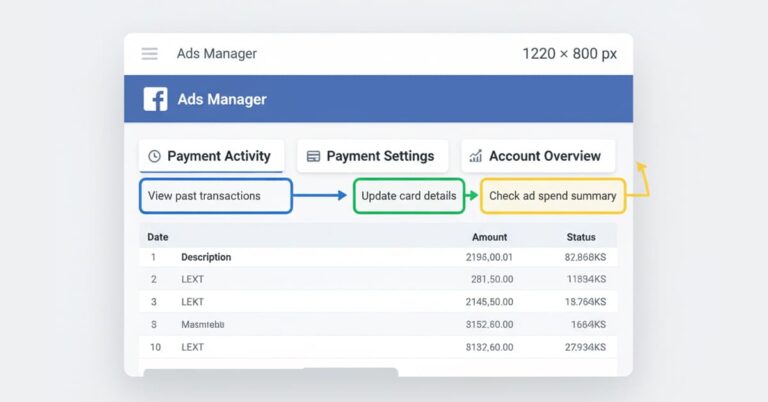
Access your payment information by following this path: Ads Manager → Menu (three lines) → Billing & Payments. This section contains three critical tabs:
Payment Activity Tab: Shows chronological transaction history, pending charges, and processing payments. Each entry includes campaign details, charge amounts, and payment method used.
Payment Settings Tab: Manages your payment methods, displays current thresholds, shows your monthly billing date, and allows threshold increase requests.
Account Overview: Provides real-time balance information, upcoming payment estimates, and account spending limits.
Requesting Threshold Increases
Jonas, an agency owner in Copenhagen, discovered the power of higher thresholds when managing multiple client accounts. By increasing his threshold from $250 to $500, he reduced payment frequency and simplified cash flow management for his growing agency operations.
Requirements for threshold increases:
- Consistent payment history (usually 2-3 successful payments)
- No recent payment failures or account restrictions
- Regular ad spending that approaches current thresholds
- Account must be in good standing per Meta’s payment policies
Process: Navigate to Payment Settings → Request increase → Specify desired amount → Wait for Facebook approval (typically 24-48 hours). According to recent guidance from SaveMyLeads, most advertisers see approval within one business day.
Benefits of higher thresholds:
- Fewer payment interruptions
- Simplified accounting and bookkeeping
- Better cash flow management for seasonal businesses
- Reduced payment processing fees
Setting Up Budget Alerts and Monitoring
Smart advertisers don’t just set budgets, they actively monitor spending patterns. Facebook’s alert system helps prevent overspending:
Daily Budget Alerts: Notifications when campaigns approach or exceed daily spending targets Account Spending Alerts: Warnings when total account spending reaches specified amounts Payment Threshold Alerts: Advance notifications before threshold charges process
Lena’s Berlin startup uses weekly spending alerts set at $200 to maintain strict budget control during their growth phase, preventing costly overspending that could impact their runway.
Your accountant will love this part.
Understanding Your Billing Statements
Facebook invoices provide detailed breakdowns of your advertising investment:
Transaction Types include:
- Ad Spend: Core advertising costs
- Taxes: VAT, GST, or other regional taxes
- Refunds: Credits for overcharges or unused spending
- Adjustments: Corrections for billing discrepancies
Invoice Information: Each invoice shows campaign names, spending periods, currency details, and tax breakdowns where applicable.
Downloading and Managing Receipts
Step-by-Step Download Process:
- Go to Billing & Payments → Payment Activity
- Select your desired date range
- Click “Download” and choose format (PDF or CSV)
- Save files with descriptive names for easy organization
Marta’s Madrid agency downloads PDF invoices monthly to handle VAT reporting requirements, while also exporting CSV files for detailed financial analysis and client billing.
Export Options:
- PDF Format: Professional invoices for accounting and client presentations
- CSV Format: Detailed data for spreadsheet analysis and financial planning
- Custom Date Ranges: Specific periods for quarterly or annual reporting
If you run ads long enough, payment issues are guaranteed.
Common Payment Method Failures
Expired Cards represent the most frequent issue. Set calendar reminders before expiration dates and update payment information promptly to avoid campaign interruptions.
Insufficient Funds can pause campaigns immediately. Facebook attempts to process payments several times over 24-48 hours before suspending ad delivery.
Bank Restrictions often affect international transactions. Ahmed in Dubai solved his bank’s automatic international payment blocks by switching to PayPal, which his bank treated as a domestic transaction.
Account-Related Payment Problems
Disabled Ad Accounts sometimes result from payment issues, suspicious spending patterns, or policy violations. Recovery requires:
- Resolving underlying payment problems
- Providing requested documentation
- Appealing through Facebook’s review process
Currency Mismatch Issues occur when payment methods use different currencies than ad account settings. This can result in higher conversion fees and payment delays.
Dispute Resolution and Refund Processes
Charge Verification Steps:
- Review campaign spending in Ads Manager
- Compare with bank/PayPal statements
- Check for multiple threshold hits in the same period
- Contact Facebook Support if discrepancies persist
Refund Scenarios:
- Overcharges due to system errors (rare but possible)
- Unused spending from paused campaigns
- Duplicate charges (usually resolved automatically)
Documentation Requirements:
- Screenshots of billing discrepancies
- Bank or PayPal transaction records
- Campaign spending reports from Ads Manager
- Clear description of the issue and requested resolution
Smart advertisers don’t just set payments, they manage them like cash flow.
Proactive Payment Management Strategies
Multiple Payment Methods: Always maintain at least two payment options. When your primary method fails, Facebook automatically attempts your backup method, preventing campaign interruptions.
Regular Monitoring: Check spending daily during active campaigns. Weekly reviews work for stable, consistent campaigns, but high-spend or new campaigns require daily attention.
Threshold Optimization: Align payment thresholds with your cash flow cycles. Monthly invoicing businesses might prefer higher thresholds, while daily revenue businesses can handle lower, more frequent charges.
Cash Flow Optimization Techniques
Billing Date Coordination: If possible, align your Facebook billing date with other major business expenses to simplify financial planning.
Seasonal Adjustments: Request threshold increases before high-spending periods (holiday campaigns) and consider decreases during slower periods.
Multi-Account Strategy: Agencies managing multiple clients should consider separate payment methods for different account groups to simplify client billing and expense tracking.
Security and Fraud Prevention
Payment Method Security:
- Use business credit cards rather than personal cards
- Monitor statements regularly for unauthorized charges
- Set up account alerts for all payment activities
- Never share payment method details with unauthorized team members
Account Access Control:
- Limit billing access to essential team members only
- Use Facebook Business Manager roles to control permissions
- Regularly audit user access and remove former employees
- Enable two-factor authentication on all accounts
For enterprises spending $100K+ per month, Facebook billing looks very different.
Enterprise Payment Solutions
Credit Line Options: High-volume advertisers can apply for Facebook credit lines, allowing extended payment terms and higher spending limits without immediate charges.
Consolidated Billing: Large agencies managing dozens of client accounts can set up master billing accounts that consolidate charges across multiple ad accounts.
Dedicated Account Management: Enterprise clients receive dedicated support for billing issues, payment processing, and account optimization.
International Payment Considerations
Multi-Currency Management: Global campaigns require careful currency planning. Exchange rate fluctuations can significantly impact campaign costs and ROI calculations.
Regional Payment Methods: Different countries offer different payment options. A UK agency with 20 international clients uses consolidated billing to simplify finance operations while accommodating local payment preferences.
Tax Implications:
- VAT handling varies by country and account setup
- International transaction fees can add 2-4% to campaign costs
- Exchange rate timing affects final costs for multi-currency accounts
Currency Hedging Strategies: Large international advertisers sometimes use financial instruments to protect against exchange rate fluctuations that could impact advertising budgets.
Key Takeaways: Master Facebook Ads Payment Like a Pro
Facebook’s dual payment system combining thresholds and monthly billing dates provides flexibility while protecting both advertisers and the platform. Understanding this system prevents surprises and enables better financial planning.
Automatic payment management handles most processes seamlessly, but proactive monitoring prevents issues before they impact campaign performance. Smart advertisers treat payment management as an integral part of campaign optimization.
Scalable solutions grow with your advertising needs. Whether you’re spending $100 or $100,000 monthly, Facebook’s payment system adapts to support your business growth and cash flow requirements.
Your Action Plan for Payment Success
- Review your current payment settings in Ads Manager today
- Add backup payment methods to prevent campaign interruptions
- Set up spending alerts aligned with your budget comfort levels
- Monitor your payment threshold and request increases when appropriate
- Download and organize billing statements for accounting purposes
Take action now: Log into your Ads Manager and review your billing settings. Understanding your current threshold, billing date, and payment methods takes just five minutes but can save you from costly campaign interruptions tomorrow.
Remember, successful Facebook advertising isn’t just about creating great ads, it’s about managing every aspect of your campaigns professionally, including the financial foundation that keeps your ads running smoothly and profitably.
Frequently Asked Questions About Facebook Ads Payment
No, Facebook uses a pay-as-you-go system. Charges occur when you reach payment thresholds or on your monthly billing date, not when campaigns launch.
Yes, PayPal is accepted in most countries and regions. It's often easier for international advertisers and provides additional security layers.
You likely hit your payment threshold twice. For example, if your threshold is $250 and you spend $500 in one day, Facebook charges you twice, once at $250 and again at $500.
Facebook attempts payment several times over 24-48 hours. If all attempts fail, your ads stop running until you resolve the payment issue or add a working payment method.
No, your monthly billing date is set when you first add a payment method and cannot be changed. However, you can manage cash flow by adjusting payment thresholds.
Facebook typically processes refunds automatically for system errors. Manual refund requests require contacting support with proper documentation and can take 5-10 business days.
New accounts start with low thresholds ($25-$50) for security reasons. Thresholds increase automatically as you establish a successful payment history with Facebook.