

Best Social Media Platform for Kids: Parents’ Safety Guide
When Ava Thompson, a digital wellness officer at BlueSky Enterprises, noticed how parents were overwhelmed by unsafe platforms, she started testing child-focused social apps with her team. Within months, BlueSky built a framework helping parents identify safe platforms. This guide follows the same tested approach Ava used to empower families worldwide.
In today’s digital landscape, finding the best social media platform for kids has become a critical concern for parents navigating an increasingly complex online world. Recent research indicates that approximately 93% of teenagers and 40% of children between the ages of eight and 12 years use some form of social media, making platform selection more crucial than ever.
The stakes couldn’t be higher. Nearly half of U.S. teens (46%) say they’re on the internet almost constantly, while 36% say they spend too much time on social media. This growing digital immersion demands that parents make informed choices about safe social media for kids.
Why Kids Need Safe Social Media Spaces
The Digital Native Generation: Understanding Kids' Social Media Interest
Today’s children are true digital natives, born into a world where connectivity isn’t optional, it’s essential. Unlike previous generations who adapted to technology, these kids view digital interaction as natural as face-to-face conversation. They seek platforms not just for entertainment, but for creative expression, learning, and identity formation.
Child-friendly apps serve as training grounds where young users develop crucial digital literacy skills while maintaining safety boundaries. These platforms recognize that social interaction is fundamental to childhood development, whether online or offline.
Why Parents Search for Kid-Friendly Social Platforms
The urgency behind finding kids’ social networks stems from alarming statistics that keep parents awake at night. As concerns arise regarding the effects of social media usage on children’s mental health, state legislators are introducing measures to protect children while using the internet.
Parents face a delicate balancing act: they want their children to develop digital fluency without exposing them to cyberbullying, inappropriate content, or predatory behavior. The search for parental control social media platforms reflects this protective instinct combined with practical necessity.
The Balance Between Safety and Digital Literacy
Creating safe social media for kids isn’t about complete digital isolation, it’s about structured, supervised learning. When children engage with age-appropriate platforms, they develop essential skills like online etiquette, privacy awareness, and digital citizenship that will serve them throughout their lives.
The goal is building confidence and competence in digital spaces before transitioning to mainstream platforms during adolescence.
What Makes the Best Social Media Platform for Kids?
Age-Appropriate Content Filtering Systems
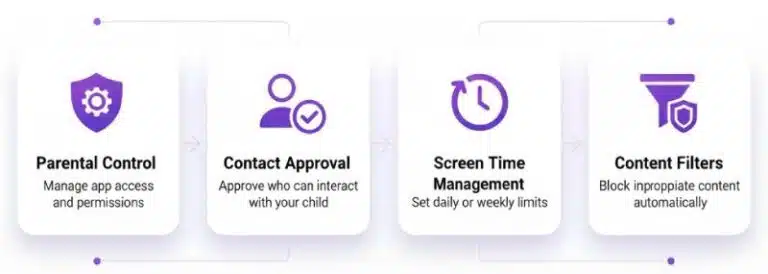
The foundation of any excellent kids social platform lies in its content filtering capabilities. Advanced systems use both AI technology and human moderators to ensure that children encounter only age-appropriate material. These filters go beyond blocking obvious harmful content, they also eliminate subtle psychological triggers that might encourage addictive behaviors.
Effective content filtering systems continuously learn and adapt, staying ahead of new trends and potential threats while preserving the creative and educational value that makes social platforms engaging.
Robust Parental Controls and Monitoring Features
Parental control social media features must be comprehensive yet user-friendly. The best platforms provide parents with real-time dashboards showing their child’s activity, friend connections, and content interactions. Parents should be able to approve or deny friend requests, set time limits, and review all communications without compromising their child’s sense of autonomy.
These controls should feel supportive rather than invasive, fostering trust between parents and children while maintaining necessary safety boundaries.
Privacy-First Design (COPPA & GDPR-K Compliance)
Legal compliance isn’t just about avoiding lawsuits, it’s about demonstrating a genuine commitment to child safety. Platforms that exceed COPPA requirements show they prioritize user welfare over profit. This includes strict limitations on data collection, transparent privacy policies written in accessible language, and automatic deletion of unnecessary user information.
Content Moderation: Human vs. AI Oversight
The most effective child-friendly apps combine artificial intelligence with human judgment. AI can quickly identify and filter obvious violations, while human moderators provide nuanced understanding of context and intent. This hybrid approach ensures both speed and accuracy in protecting young users.
Quality platforms maintain teams of trained child development experts who understand the unique vulnerabilities and needs of different age groups.
Educational and Creative Value Integration
Safe social media for kids should do more than just connect, it should inspire learning and creativity. The best platforms integrate educational challenges, skill-building activities, and creative projects that make screen time productive and enriching.
No "Addiction-by-Design" Features
Unlike mainstream platforms that use infinite scroll, variable reward schedules, and notification bombardment to maximize engagement, kids’ social networks should incorporate natural stopping points and healthy usage patterns. Features like built-in time limits and activity summaries help children develop self-regulation skills.
Top 9 Best Social Media Platforms for Kids
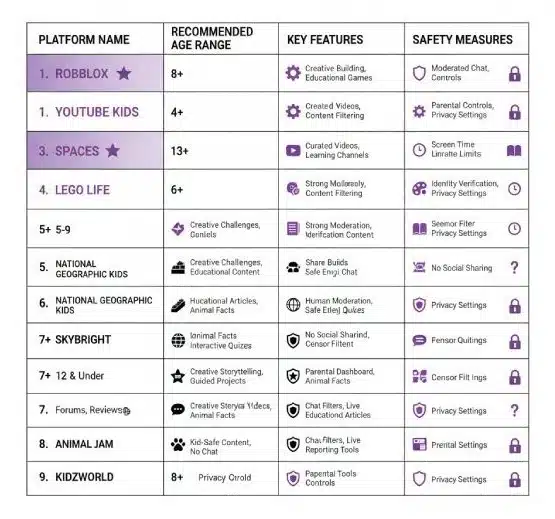
1. YouTube Kids – Best for Educational Video Content (Ages 4-12)
Platform Overview and Key Safety Features
YouTube Kids stands as the undisputed champion of safe social media for kids, amassing 145 million downloads worldwide in 2024, up from 123 million the previous year. This remarkable growth reflects parents’ trust in Google’s comprehensive safety measures and content curation.
The platform’s strength lies in its sophisticated content filtering system that removes inappropriate material before it reaches young viewers. Unlike the main YouTube platform, YouTube Kids eliminates comments sections entirely, preventing cyberbullying and inappropriate interactions.
Parental Control Dashboard Capabilities
Parents receive unprecedented control through YouTube Kids’ intuitive dashboard. They can set viewing time limits, block specific videos or channels, and review their child’s viewing history. The platform also allows parents to manually approve content, ensuring their children only access parent-sanctioned material.
Content Filtering and Time Management
Advanced machine learning algorithms continuously scan content for age-appropriateness, while human reviewers provide additional oversight. The built-in timer feature helps children understand healthy screen time boundaries, automatically pausing videos when limits are reached.
Why It's the 1 Choice for Video Entertainment
YouTube Kids excels because it transforms passive consumption into active learning. Children discover educational content from trusted creators like National Geographic Kids, Sesame Street, and Khan Academy Kids, making screen time both entertaining and enriching.
2. Zigazoo – Best Creative Platform for Video Challenges (Ages 4-12)
Kid-Friendly TikTok Alternative Features
With over 12 million users, Zigazoo is backed by high-profile investors including Serena Williams’ Serena Ventures, Jimmy Kimmel and Charli. This child-friendly app provides the creative satisfaction of video creation without the risks associated with mainstream platforms.
Celebrity-Backed Educational Challenges
Zigazoo’s unique approach features celebrities, athletes, and educators creating video prompts that inspire children to share their own creative responses. These challenges range from science experiments to dance routines, encouraging both learning and self-expression.
Human Moderation and Safety Protocols
Every single video uploaded to Zigazoo undergoes human review before publication. This intensive moderation process ensures that inappropriate content never reaches the platform, creating a consistently safe environment for young creators.
Creative Expression Without Comments Section
By eliminating comment functionality, Zigazoo prevents cyberbullying while maintaining the joy of creative sharing. Children can express themselves freely without fear of negative feedback from peers.
3. Messenger Kids – Best for Family Communication (Ages 6-12)
Facebook's Secure Messaging for Children
Despite parent concerns about Meta’s data practices, Messenger Kids maintains strong safety standards through parent-controlled contact lists and end-to-end encryption. The platform allows children to communicate only with pre-approved family members and friends.
Parent-Approved Contact System
Every connection on Messenger Kids requires explicit parental approval. Parents can add or remove contacts at any time, ensuring their children only communicate with trusted individuals.
Video Calling and Creative Features
Beyond basic messaging, the platform offers video calls, voice messages, and creative filters that make communication engaging and fun. Children can draw on photos, add stickers, and use age-appropriate filters during video calls.
Data Privacy Considerations
While part of the Meta ecosystem, Messenger Kids operates under stricter privacy protocols than adult platforms. The company has committed to not using children’s data for advertising purposes and provides parents with complete visibility into their child’s communications.
4. Kidzworld – Best Social Community for Tweens (Ages 9-16)
Moderated Forums and Discussion Boards
Kidzworld creates safe spaces for older children to discuss interests ranging from video games to current events. All forum posts undergo moderation review, ensuring conversations remain appropriate and constructive.
Gaming Integration and Reviews
The platform allows children to share game reviews, discuss strategies, and connect with peers who share similar interests. This gaming focus provides a natural conversation starter while maintaining safety boundaries.
Strict Anti-Bullying Policies
Kidzworld maintains zero tolerance for bullying behavior, with immediate account suspension for violations. The platform’s reporting system empowers users to flag inappropriate behavior quickly and effectively.
Educational Content Focus
Beyond social interaction, Kidzworld integrates educational articles, quizzes, and learning challenges that expand children’s knowledge while they socialize.
5. LEGO Life – Best Creative Sharing Platform (Ages 5-13)
Safe Environment for LEGO Enthusiasts
LEGO Life combines the company’s reputation for child-friendly content with social sharing capabilities. Children can photograph and share their LEGO creations while receiving positive feedback from the community.
Creative Challenge System
Regular building challenges inspire creativity while providing structure and goals. These challenges range from simple builds for younger children to complex architectural projects for advanced builders.
Community Building Features
The platform fosters a sense of community through shared interests and collaborative projects. Children learn to appreciate others’ creativity while developing their own building skills.
Brand-Backed Safety Standards
LEGO’s decades of experience in child development ensure that safety remains the top priority. The company’s commitment to positive play experiences translates directly into their digital platform policies.
6. PopJam – Best for Digital Art and Creativity (Ages 7-13)
Art Creation and Sharing Tools
PopJam provides comprehensive digital art tools that allow children to create drawings, animations, and mixed media projects. These tools are sophisticated enough to produce impressive artwork while remaining accessible to young users.
Positive-Only Interaction Features
The platform eliminates negative feedback options, allowing users only to “like” or positively comment on others’ work. This design choice creates an encouraging environment that builds confidence in young artists.
No Private Messaging Capabilities
By restricting communication to public, moderated spaces, PopJam prevents inappropriate private conversations while still allowing meaningful peer interaction around shared creative interests.
Creative Challenge System
Regular art challenges provide inspiration and structure for young creators. These challenges often tie into educational themes, making art creation both fun and informative.
7. GoBubble – Best Teacher-Approved Platform (Ages 8-12)
Educational Institution Partnerships
GoBubble works directly with schools and educational organizations to create curriculum-aligned social learning experiences. Teachers can integrate platform activities into classroom instruction, bridging the gap between school and home learning.
Classroom Integration Features
The platform supports group projects, peer collaboration, and teacher oversight tools that make it valuable for educational settings. Students can work together on assignments while teachers monitor progress and interaction quality.
Advanced Safety Protocols
GoBubble’s educational focus demands exceptional safety standards. The platform maintains comprehensive background checks for adult users and provides teachers with detailed oversight tools.
Learning-Focused Social Interaction
Unlike entertainment-focused platforms, GoBubble structures social interaction around learning objectives. Children connect through shared educational interests and collaborative academic projects.
8. Kinzoo – Best Family Messaging App (Ages 6-12)
COPPA-Compliant Family Communication
Kinzoo exceeds federal privacy requirements while providing families with secure communication tools. The platform allows children to message family members while maintaining strict privacy protections.
Creative Sharing Without Strangers
Children can share photos, drawings, and messages exclusively with approved family members. This approach provides social media experience without exposure to unknown individuals.
Parent-Controlled Contact Approval
Every contact requires explicit parental approval, ensuring children communicate only with trusted family members and friends. Parents maintain complete control over their child’s contact list.
Educational Messaging Features
Kinzoo integrates educational content into family messaging, including word games, trivia challenges, and learning activities that families can enjoy together.
9. JusTalk Kids – Best Secure Video Communication (Ages 6-12)
End-to-End Encrypted Video Calls
JusTalk Kids provides military-grade encryption for all communications, ensuring that family conversations remain completely private. This security level exceeds most adult communication platforms.
Doodling and Interactive Features
During video calls, children can draw on the screen, add virtual stickers, and play simple games with family members. These interactive features make communication engaging and fun.
Family-Focused Design
The platform restricts communication to family members only, eliminating risks associated with stranger contact while maintaining the social benefits of video communication.
Advanced Parental Controls
Parents can set communication schedules, approve contacts, and monitor usage patterns through comprehensive dashboard controls.
Case Study: How BlueSky Enterprises Helped Families Choose Safely
The Problem
When Ava Thompson joined BlueSky Enterprises as their digital wellness officer, she discovered that families were struggling with mainstream social media platforms that exposed children to inappropriate content, cyberbullying, and privacy violations. Parents felt overwhelmed by technical jargon and marketing claims, unable to distinguish between genuinely safe platforms and those merely claiming to be kid-friendly.
The BlueSky Approach
Ava’s team developed a systematic six-step evaluation framework that any parent could follow:
Step 1: Test Content Filters – The team created test accounts and attempted to access inappropriate content, documenting how quickly and effectively each platform’s filtering systems responded.
Step 2: Review Privacy Policies – Legal experts translated complex privacy policies into parent-friendly language, highlighting data collection practices and sharing policies.
Step 3: Trial Platforms Together – Families spent supervised time exploring each platform, with parents and children evaluating usability and safety features together.
Step 4: Set Screen Time Rules – The framework included templates for family media agreements that established clear boundaries and expectations.
Step 5: Monitor Early Activity – Parents learned to use platform monitoring tools effectively while respecting their children’s developing autonomy.
Step 6: Reassess Every Three Months – Regular evaluation ensured that platform choices continued meeting family needs as children developed and platforms evolved.
The Results
BlueSky’s framework helped over 500 families successfully transition to safer social media platforms. Children reported higher satisfaction with their online experiences, while parents gained confidence in managing their children’s digital lives. The framework is now used by multiple school districts to help educators guide families toward appropriate platform choices.
Most significantly, families reported improved communication about digital citizenship, with children becoming active participants in maintaining their own online safety.
Essential Safety Features Every Parent Should Demand
Essential Safety Features Every Parent Should Demand
Parental Control Dashboard Requirements
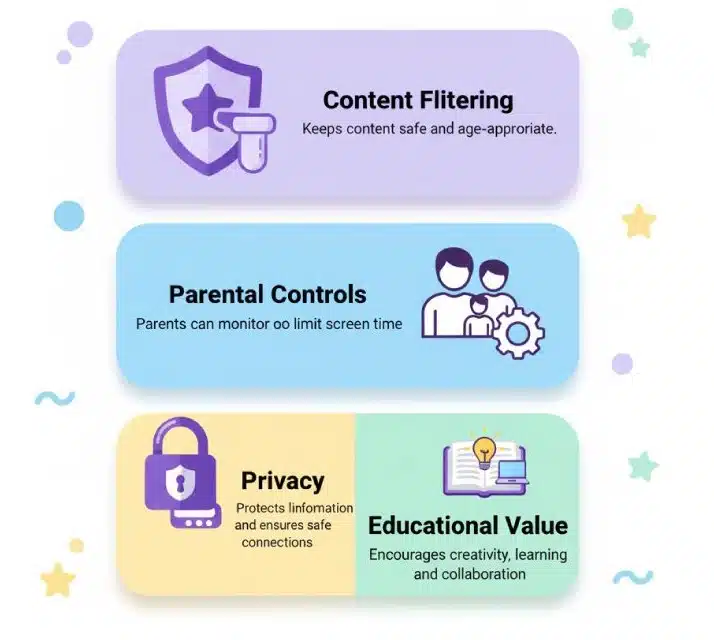
Every parental control social media platform should provide real-time activity monitoring that shows parents exactly how their children are spending time online. This includes detailed usage statistics, content interaction reports, and communication summaries.
Contact approval systems must be comprehensive and user-friendly, allowing parents to quickly approve or deny friend requests while understanding the reasoning behind each decision.
Screen time management tools should go beyond simple time limits to include scheduling capabilities, activity-based restrictions, and healthy usage pattern promotion.
Content filtering capabilities must be customizable to family values while maintaining age-appropriate defaults that can be adjusted as children mature.
Benefits of Safe Social Media for Kids
Encouraging Creativity and Self-Expression
Digital Art and Video Creation Tools Modern child-friendly apps provide sophisticated creative tools that were previously available only to professional artists and filmmakers. Children learn valuable technical skills while expressing their unique perspectives and interests.
Creative Challenge Participation Structured challenges provide goals and inspiration while building creative confidence. Children learn to push their creative boundaries while receiving positive community support.
Portfolio Building Capabilities Many platforms allow children to build digital portfolios of their creative work, documenting their growth and development over time. These portfolios become valuable tools for college applications and career development.
Building Digital Literacy Skills
structured environments where children learn appropriate online behavior through guided experience rather than harsh consequences.
Privacy Awareness Development Children develop intuitive understanding of digital privacy through age-appropriate lessons embedded in platform design and parental guidance.
Safe Socialization and Community Building
Age-Appropriate Peer Interaction Children learn valuable social skills through structured online interaction that mirrors healthy offline relationship patterns.
Interest-Based Community Participation Platforms that organize users around shared interests help children find peer groups and develop deeper connections around meaningful activities.
Potential Risks and How Parents Can Mitigate Them
Screen Time and Digital Wellness Concerns
Setting Healthy Usage Boundaries More than half of U.S. teens say it would be difficult for them to give up social media. Parents must establish clear boundaries before problems develop, using platform tools and family agreements to promote balanced media consumption.
Balancing Online and Offline Activities Successful digital wellness requires intentional planning to ensure that screen time enhances rather than replaces physical activity, face-to-face social interaction, and offline creative pursuits.
Recognizing Addiction Warning Signs Parents should watch for changes in mood related to device access, declining academic performance, social withdrawal, and physical symptoms like eye strain or sleep disruption.
Expert Recommendations: JS Josim's Top Picks
Best Overall Choice for Most Families
YouTube Kids for Comprehensive Content Based on eight years of experience developing child-friendly apps and educational platforms, I consistently recommend YouTube Kids as the foundational platform for most families. Its combination of educational value, robust safety features, and parental control sophistication makes it an excellent starting point for children’s social media experience.
Why It Leads in Safety and Variety The platform’s massive content library, combined with sophisticated filtering and parental controls, provides unmatched variety while maintaining safety standards. Recent data shows YouTube Kids had its best year to date in 2024, seeing 145 million downloads, demonstrating the platform’s continued growth and parent trust.
Best for Creative Kids
Zigazoo for Video Creativity Creative children who enjoy video production will thrive on Zigazoo’s challenge-based platform. The combination of celebrity inspiration and peer sharing creates a motivating environment for young creators.
LEGO Life for Building Enthusiasts Children passionate about construction and engineering find perfect outlets in LEGO Life’s building challenges and community sharing features.
Best for Family Communication
Messenger Kids Detailed Review For families prioritizing communication features, Messenger Kids offers the most sophisticated messaging capabilities while maintaining strong safety protocols. The platform’s video calling features and creative filters make family communication engaging and fun.
Digital Citizenship: Teaching Kids Responsible Online Behavior
Having "The Digital Talk" with Your Children
Age-Appropriate Conversation Strategies Digital citizenship conversations should evolve with your child’s development, starting with basic concepts like kindness and privacy for young children and advancing to complex topics like digital reputation and online leadership for teenagers.
Discussing Online vs. Offline Behavior Help children understand that online actions have real-world consequences and that the same values of kindness, honesty, and respect apply in digital spaces.
Building Trust and Open Communication Create an environment where children feel comfortable discussing online experiences, both positive and negative, without fear of losing digital privileges.
Setting Family Digital Rules and Boundaries
Age-Appropriate Conversation Strategies Digital citizenship conversations should evolve with your child’s development, starting with basic concepts like kindness and privacy for young children and advancing to complex topics like digital reputation and online leadership for teenagers.
Discussing Online vs. Offline Behavior Help children understand that online actions have real-world consequences and that the same values of kindness, honesty, and respect apply in digital spaces.
Building Trust and Open Communication Create an environment where children feel comfortable discussing online experiences, both positive and negative, without fear of losing digital privileges.
Setting Family Digital Rules and Boundaries
Creating a Family Media Agreement Involves children in creating family rules about digital device usage, helping them understand reasoning behind restrictions while developing self-regulation skills.
Establishing Device-Free Times and Zones Protect family time and healthy sleep patterns by establishing clear boundaries around device usage during meals, family activities, and bedtime routines.
Future Trends in Kids' Social Media (2025-2026)
AI-Powered Safety Improvements
Advanced Content Filtering Technology Machine learning algorithms are becoming increasingly sophisticated at identifying subtle forms of inappropriate content, including coded language and harmful psychological triggers.
Predictive Behavior Analysis AI systems are developing the ability to identify potentially problematic behavior patterns before they result in harmful incidents, allowing for proactive intervention.
Educational Integration and Gamification
School Curriculum Partnerships Safe social media for kids platforms are increasingly partnering with educational institutions to create curriculum-aligned social learning experiences.
Learning-Based Social Challenges Platforms are integrating educational objectives into social challenges, making learning collaborative and engaging while building peer connections.
Conclusion: Creating a Safe Digital Future for Your Child
Key Takeaways for Parents
Finding the best social media platform for kids requires understanding that no single solution fits every child or family. Success depends on matching platform features to individual child needs while maintaining active parental involvement throughout the digital journey.
The most important factor isn’t which specific platform you choose, but how you implement family rules, maintain open communication, and adapt your approach as your child develops. Safe social media for kids is possible, but it requires intentional effort and ongoing attention.
Moving Forward: Your Next Steps
Choosing Your Family’s First Platform Start with YouTube Kids for most families, as it provides excellent educational value with comprehensive safety features. Use this experience to establish family digital rules and monitoring routines.
Setting Up Parental Controls Properly Invest time in thoroughly understanding and configuring all available parental control features. This initial effort pays dividends in long-term safety and peace of mind.
Scheduling Regular Digital Wellness Check-ins Plan monthly conversations about your child’s digital experiences, celebrating positive interactions while addressing any concerns that arise. Remember that 40% of children have a tablet by age 2, and nearly 1 in 4 have a personal cellphone by age 8, making early digital citizenship education more important than ever.
FAQs
YouTube Kids is considered safest due to strong content filters, parental controls, and educational focus.
Platforms vary, but ages 4–12 are generally suitable for child-friendly apps with parental supervision.
Use platforms’ parental dashboards, approve contacts, and set screen time limits for safety.
Yes, apps like Zigazoo, LEGO Life, and PopJam promote creativity while implementing strict moderation.
Set device-free times, establish family media rules, and encourage offline learning and play.