Finding safe, engaging educational content for toddlers can feel overwhelming in today’s digital landscape. With the educational apps market projected to reach $135.36 billion by 2030 and approximately 65% of children aged 3-10 using educational apps weekly, parents face more choices than ever. This comprehensive guide helps you navigate these options while prioritizing safety and developmental appropriateness.
Understanding Toddler-Friendly Design
Educational websites for young children require specialized approaches that differ significantly from adult-focused platforms. The apps for kids market growing at 26.71% CAGR reflects increasing demand for age-appropriate digital learning solutions.
Essential Design Elements
Large Interactive Elements: Toddlers lack the fine motor control needed for small buttons or precise clicking. Quality educational sites feature buttons at least 44 pixels wide with high-contrast colors that are easy to target—a design principle backed by accessibility standards and early childhood development research.
Audio-First Learning: Since most toddlers cannot read, effective platforms prioritize clear narration, engaging sound effects, and musical elements. This aligns with natural language acquisition patterns in early childhood development.
Simple Navigation: The best toddler sites require minimal adult assistance after initial setup. Navigation should be intuitive enough for a 3-year-old to understand independently—reducing frustration and building confidence in digital literacy.
Immediate Feedback: Toddlers need instant positive reinforcement to maintain engagement. Quality platforms provide immediate audio and visual celebrations for interactions, building confidence and encouraging continued exploration.
Age-Appropriate Learning Focus
Colors and Shapes: Fundamental visual discrimination skills form the foundation for later academic learning. Look for platforms that progress from simple identification to complex sorting activities, supporting cognitive development milestones.
Phonics Introduction: Early exposure to letter sounds significantly impacts reading success. The best sites integrate phonics naturally through songs and interactive games rather than formal lessons, making learning feel like play.
Social-Emotional Skills: Modern educational platforms recognize emotional intelligence as equally important as cognitive development. Look for scenarios teaching empathy, patience, and emotional regulation through relatable characters and situations.
Top Educational Websites for Toddlers
Read the related article: Top 10 Educational Websites for Students
After evaluating platforms based on safety, educational value, and age-appropriateness, these sites represent the most reliable options for toddler learning in the current market.
Free Platforms
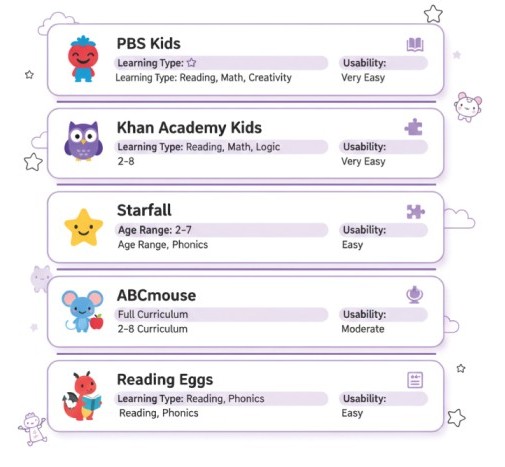
PBS Kids
What makes it special: Completely free access to educational games featuring trusted characters like Daniel Tiger and Elmo
Key features: Over 200 activities covering math, reading, science, and social skills
Safety: Ad-free environment with strong privacy protections and COPPA compliance
Parent tools: Dashboard for progress tracking and learning insights
Best for: Parents seeking comprehensive free content with familiar characters
Khan Academy Kids
What makes it special: Advanced adaptive learning technology at no cost a rarity in the educational technology space
Key features: Personalized learning paths that adjust to individual progress, creative activities including drawing and storytelling
Unique advantage: Offline functionality for learning without internet
Best for: Families wanting premium features without subscription costs
Starfall
What makes it special: Specialized focus on phonics and early reading development with systematic progression
Key features: Interactive songs and rhymes reinforcing phonetic patterns, printable worksheets for offline practice
Educational approach: Systematic progression from letter recognition to reading comprehension
Best for: Parents prioritizing early literacy development and structured learning
Premium Platforms
ABCmouse
What makes it special: Comprehensive structured curriculum with over 10,000 activities designed by educational experts
Key features: Age-specific learning paths for systematic skill development, detailed progress reports
Investment: Monthly subscription required but often includes family discounts
Best for: Parents preferring structured, curriculum-based learning with measurable progress
Reading Eggs
What makes it special: Systematic reading instruction with placement testing to meet children at their level
Key features: Comprehensive curriculum from pre-reading to early chapter books, reward system with virtual prizes
Educational approach: Research-based phonics instruction combined with sight word recognition
Best for: Families seeking measurable reading progress and systematic literacy development
Interactive Tip: Start with free platforms to assess your toddler’s engagement patterns before investing in premium subscriptions. Most children show preference within the first week of use.
Safety Considerations and Red Flags
Creating a secure digital learning environment requires vigilance about both technical security and child development factors. With 389,000 education apps available across major platforms, safety screening becomes crucial.
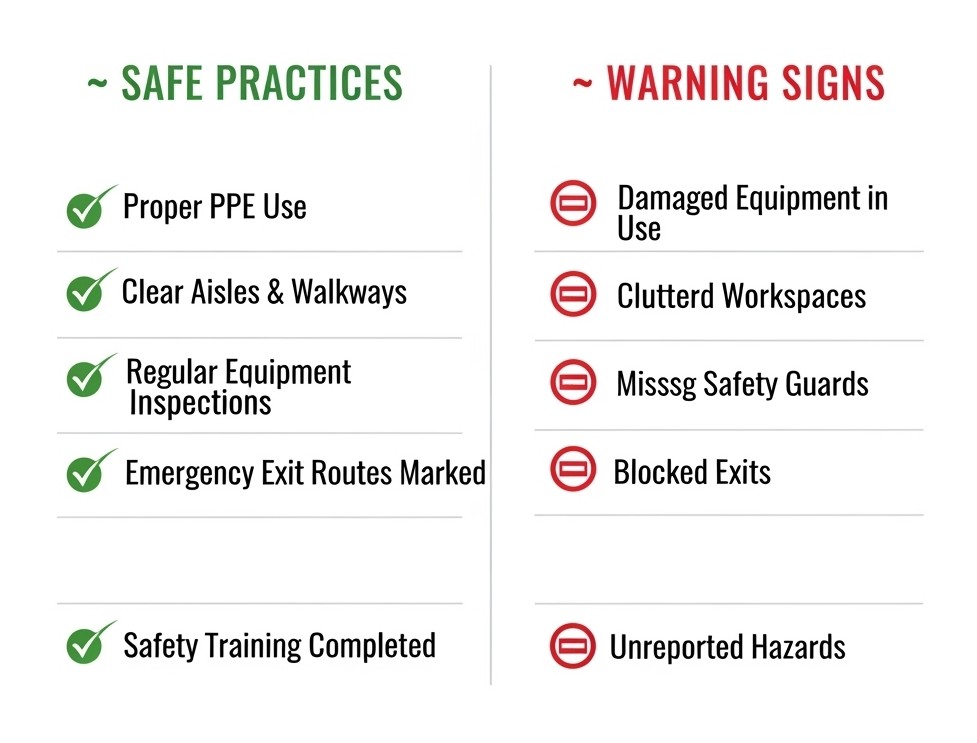
Essential Safety Features to Look For
COPPA Compliance: Legitimate educational websites prominently display compliance with the Children’s Online Privacy Protection Act, which mandates specific protections for children under 13.
HTTPS Security: Always verify that educational sites use HTTPS encryption, indicated by a lock icon in your browser’s address bar—a basic but essential security measure.
Ad-Free Environment: Quality educational platforms maintain completely ad-free experiences or clearly separate any promotional content from learning activities to prevent distraction and inappropriate exposure.
No External Links: The safest platforms either eliminate external links entirely or require explicit parental permission before allowing navigation away from educational content.
Warning Signs to Avoid
Inappropriate Advertisements: Immediately discontinue use of sites displaying violent content, inappropriate products, or adult-targeted advertisements within children’s learning areas.
Excessive Data Collection: Be cautious of platforms requesting unnecessary personal information or having unclear privacy policies about tracking user behavior—especially concerning recent data privacy concerns.
Overstimulating Content: Avoid websites featuring flashing lights, overwhelming sound effects, or hyperactive animations that may overstimulate sensitive children or interfere with learning focus.
Screen Time Guidelines and Best Practices
Current pediatric recommendations from the American Academy of Pediatrics and CDC suggest specific guidelines based on developmental stages:
Age-Specific Screen Time Recommendations
- Under 18 months: No screen time except video chatting with family
- 18-24 months: Only high-quality educational media with active parental engagement
- 3-5 years: Up to one hour daily of high-quality programming with parental involvement
- School-age: Balanced screen time focusing on educational content with clear boundaries
Implementation Strategies
Co-Viewing Requirements: Educational screen time should involve active parent participation. Research shows that interactive engagement significantly improves learning outcomes compared to passive consumption.
The 4 M’s Approach: Modern pediatric guidelines recommend:
- Minimize: Keep screen time within recommended limits
- Mitigate: Choose high-quality, educational content
- Mindfully use: Engage actively during screen time
- Model: Demonstrate healthy technology habits
Balanced Learning Approach: Ensure digital learning complements rather than replaces hands-on activities, outdoor play, and social interaction—the foundation of healthy child development.
Pro Tip: Use visual timers or built-in platform timers to help toddlers understand time boundaries and transition smoothly between activities.
Choosing the Right Platform
Selecting optimal educational websites requires systematic evaluation of your toddler’s specific needs and learning preferences.
Assessment Steps
- Identify Learning Style
Visual learners: Respond to colorful graphics and animations
Auditory learners: Thrive with songs and spoken instructions
Kinesthetic learners: Need interactive, hands-on elements
- Define Clear Goals
- School readiness and academic skills
- Social-emotional development
- Creative expression and imagination
- Specific skills like early literacy or numeracy
- Test User Experience
- Can your toddler navigate independently?
- Does the platform maintain engagement without constant adult assistance?
- Are loading times appropriate for short attention spans?
- Evaluate Safety Features
- COPPA compliance verification
- Privacy policy review
- Ad policy assessment
- External link restrictions
Making the Most of Digital Learning
Educational websites work best when integrated thoughtfully into broader learning experiences rather than serving as standalone solutions.
Enhancement Strategies
Real-World Connections: Connect digital learning to offline activities. If your toddler learns about animals online, visit a zoo or read animal books to reinforce concepts and create meaningful learning experiences.
Progress Monitoring: Use parent dashboards to track learning patterns and identify areas where your child shows particular interest or needs additional support—valuable data for supporting development.
Technology Modeling: Demonstrate healthy technology use through your own behavior. Toddlers learn more from observing parent habits than from verbal instructions about appropriate usage.
Common Pitfalls to Avoid
Passive Consumption: Avoid using educational websites as electronic babysitters. Active engagement produces significantly better learning outcomes and supports healthy development patterns.
Comparison Pressure: Don’t pressure your toddler to achieve milestones based on platform recommendations. Children develop at individual paces, and forcing advancement can create negative associations with learning.
Over-Dependence: If your toddler becomes overly attached to digital learning, gradually reduce usage while increasing engaging offline alternatives to maintain developmental balance.
Frequently Asked Questions
Current pediatric guidelines recommend minimal to no screen time for children under 18 months, except for video chatting. For 18-24 months, very limited exposure (10-15 minutes) to high-quality educational content with active parent participation can be appropriate. The key is ensuring digital learning supplements rather than replaces hands-on exploration and social interaction.
Medical professionals consistently recommend maximum one hour of high-quality educational content daily for children aged 3-5, with co-viewing and active parent participation. For younger toddlers (18 months-3 years), even less screen time is preferable. However, quality matters more than quantity—15 minutes of interactive, educational content with parent engagement provides more developmental benefit than passive consumption of longer content.
Educational websites complement but cannot replace traditional early childhood learning approaches. The most effective early learning combines digital tools with hands-on manipulation, social interaction, and real-world exploration. Digital learning excels at providing repeated practice, immediate feedback, and adaptive challenge levels, while traditional methods excel at social-emotional development and complex problem-solving through physical manipulation.
Implement multiple protection layers: use HTTPS-enabled websites, maintain robust parental control software, restrict access to pre-approved educational platforms only, and provide active supervision. Position yourself where you can observe screen content while allowing independent exploration, and maintain open communication about online experiences.
Gradual reduction typically works better than abrupt elimination. Slowly decrease daily screen time while increasing engaging offline alternatives like puzzles, books, and outdoor activities. Create structured routines that naturally limit screen time and focus on activities that provide similar engagement through hands-on learning.